
The Profiler is building an unique Profile per network device. Currently this profile contains the following:
- Prefered SSH vault
- Remembers the Vault ID that worked last time and tries that first when Collecting data from a Device.
- Prefered SNMP vault
- Remembers the Vault ID that worked last time and tries that first when Scanning a Device.
- Learned SSH timeout
- It takes the configured time-out and raises it a couple times to see if that improves the Data Collection.
- Learned SNMP timeout
- It takes the configured time-out and raises it a couple times to see if that improves the Device Discovery.
- Blacklisted
- An active marked device which is not reachable will be automatically Blacklisted. This way it won't hold down the Discovery process. When the device is reachable again it will be removed from the Blacklisted list.
Since the profiler is scanning your existing inventory it's recommended for Enterprise networks to give it a dedicated server.
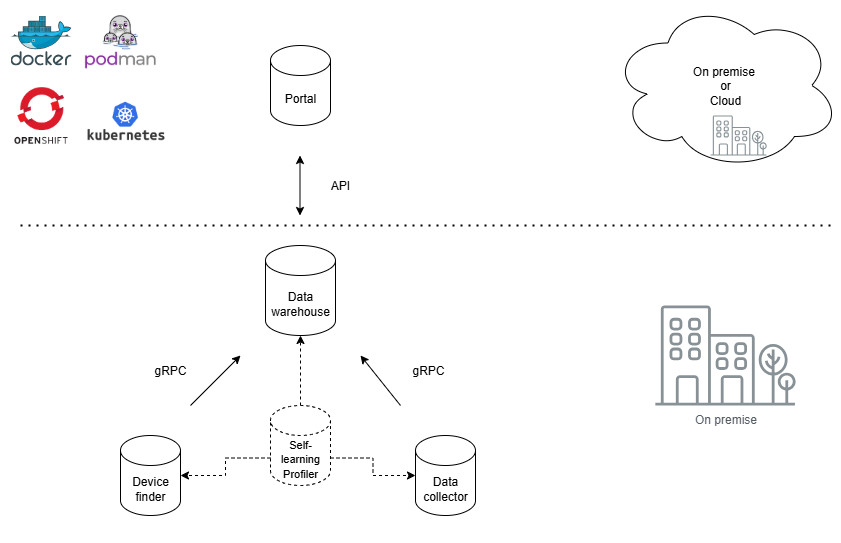
Profiler lives between the Device finder & Data Collector. Look at the image for a better explanation.
How to set it up?
On our Gitlab page you can find the latest Example configuration:
Profiler Example Configuration on Gitlab
Or you copy the following
name: slurpit
services:

  slurpit-profiler:
    image: slurpit/scraper:latest
    container_name: slurpit-profiler
    environment:
      TZ: Europe/Amsterdam
      SCRAPER_TIMEOUT: 20
      SCRAPER_POOLSIZE: 8
      SCRAPER_DEBUG: false
      SCRAPER_WAREHOUSE_HOSTNAME: slurpit-warehouse-ip-or-fqdn
      SCRAPER_IDENTIFIER: "profiler"
      SCRAPER_POLL_ENABLED: false
      SCRAPER_POLL_TESTS_ENABLED: false
      SCRAPER_POLL_PROFILER_ENABLED: true
    restart: always
    networks:
      - slurpit-network

networks:
  slurpit-network:
    driver: bridge
- Replace slurpit-warehouse-ip-or-fqdn for the IP toward the Warehouse Server, and make sure the gRPC port is opened on the Warehouse server (50051). It's also possible to change the ports on both the worker and the warehouse.
- Make sure the following is configued
SCRAPER_POLL_PROFILER_ENABLED: true
- Save this as docker-compose.yml
- place it on a seperate server and run it by typing: docker compose up --build -d
Disable the profiler on the other Scraper workers to enforce this server to use it.
- Change all the Scraper workers
- Set the following variable:
SCRAPER_POLL_PROFILER_ENABLED: false
Example configuration
  slurpit-scraper:
    image: slurpit/scraper:latest
    environment:
      TZ: America/Chihuahua
      SCRAPER_TIMEOUT: 60
      SCRAPER_COMMAND_TIMEOUT: 120
      SCRAPER_POLL_ENABLED: true
      SCRAPER_POLL_TESTS_ENABLED: true
      SCRAPER_POLL_PROFILER_ENABLED: false
      SCRAPER_TAGS: '[]'
      SCRAPER_POOLSIZE: 8
      SCRAPER_WAREHOUSE_HOSTNAME: slurpit-warehouse
      SCRAPER_DEBUG: false