
We recommend for every 3000 devices to spin up a dedicated Scanner & Scraper. This way you can devide the load of collecting data from the Network over multiple physical instances. Per worker it's also possible to enable and disable certain features. This way we can:
- Load Discovery Jobs per security domain with Worker Tags.
- Disable the Profiler functionality for certain workers, and create a dedicated profiler. Read more
- Setup a special Worker for on-demand requests from the Web-GUI. This way when the Queue is full or the Workers are busy and you try to test or build a template or Test and SNMP connection that the application flow continues smoothly.
With an Enterprise license it's possible to spin up Multiple Scanner & Scrapers
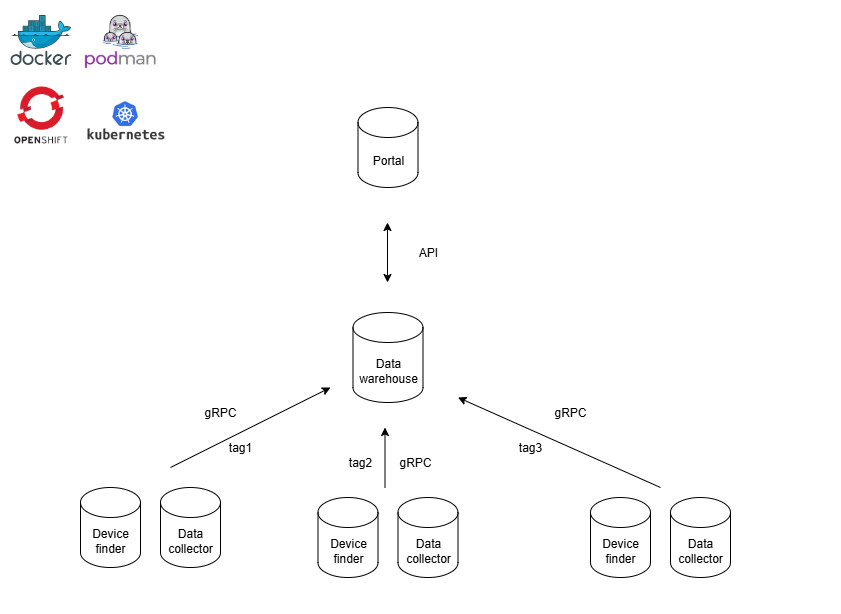
How to set it up?
On our Gitlab page you can find the latest Example configurations for the workers:
Example Configuration on Gitlab
Or you copy the following
name: slurpit
services:
  slurpit-scanner:
    image: slurpit/scanner:latest
    container_name: slurpit-scanner
    networks:
      - slurpit-network
    environment:
      TZ: Europe/Amsterdam
      SCANNER_POOLSIZE: 8
      SCANNER_SNMP_TIMEOUT: 6
      SCANNER_WAREHOUSE_HOSTNAME: slurpit-warehouse-ip-or-fqdn
      SCANNER_IDENTIFIER: scanner
      SCANNER_TAGS: '[]'
    restart: always

  slurpit-scraper:
    image: slurpit/scraper:latest
    container_name: slurpit-scraper
    environment:
      TZ: Europe/Amsterdam
      SCRAPER_TIMEOUT: 20
      SCRAPER_POOLSIZE: 8
      SCRAPER_DEBUG: false
      SCRAPER_WAREHOUSE_HOSTNAME: slurpit-warehouse-ip-or-fqdn
      SCRAPER_IDENTIFIER: "scraper"
     # Set to false to Disable the Data Collection / Scraper functionality
      SCRAPER_POLL_ENABLED: true
     # Set to false to disable On-demand requests for this worker
      SCRAPER_POLL_TESTS_ENABLED: true
     # Set to false to Disable profiler functionality
      SCRAPER_POLL_PROFILER_ENABLED: true
     # Set here the Worker Tags as configured in the GUI, when no Tag is configured it runs Round Robin
      SCRAPER_TAGS: '[]'
    restart: always

networks:
  slurpit-network:
    driver: bridge
- Replace slurpit-warehouse-ip-or-fqdn for the IP toward the Warehouse Server, and make sure the gRPC port is opened on the Warehouse server (50051). It's also possible to change the ports on both the worker and the warehouse.
- Save this as docker-compose.yml
- place it on a seperate server and run it by typing: docker compose up --build -d