
NetBox plugin · Step-by-step guide
How to populate NetBox from your live network and keep it in sync
Most NetBox projects stall at the same point: the data model is ready, but nobody wants to type 800 devices and 20,000 interfaces into it by hand, and nobody trusts a one-off CSV import six months later.
Slurp'it is an agentless network discovery and inventory tool. It collects device, hardware, interface, IP, VLAN and neighbour data from 180+ vendors, parses it with 1,800+ community TextFSM templates, and keeps NetBox, Nautobot or another source of truth in sync with the live network. The open-source Slurp'it NetBox plugin adds a Slurp'it menu inside NetBox with five pages. This guide walks through them in the order you use them; everything shown runs in the NetBox sandbox.
NetBox 3.7 or newerOn-prem or Cloud. One plugin series per NetBox release; 4.7 needs 1.5.x.
A Slurp'it instanceThe free Foundation edition includes the plugin and onboards unlimited devices.
A Slurp'it API keyCreated in Slurp'it, pasted once into the plugin settings.
30 minutesFor the first site. After that it runs on a schedule.
Step 1 · Settings
Connect the plugin to Slurp'it
pip install --no-cache-dir slurpit_netbox
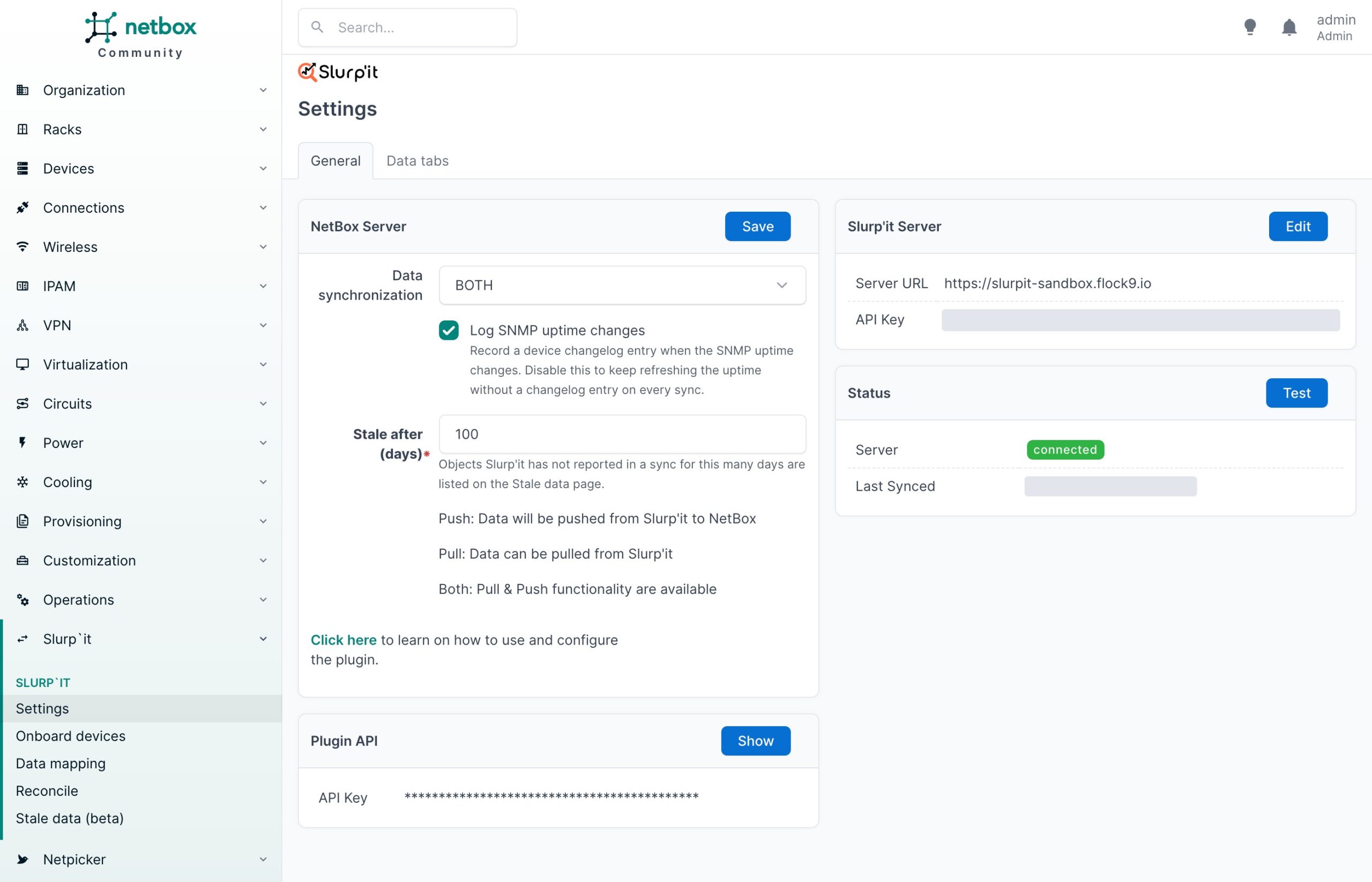
Add 'slurpit_netbox' to PLUGINS in configuration.py, add it to requirements.txt, restart NetBox (full instructions). Then open Slurp'it → Settings:
- Slurp'it server: URL and API key. Click Test; status should read connected.
- Data synchronization: Push (Slurp'it → NetBox), Pull (NetBox → Slurp'it) or Both. Most teams start with Both.
- Stale after (days): objects Slurp'it has not reported for this long appear on the Stale data page.
- Log SNMP uptime changes: a changelog entry per uptime change; switch off to refresh uptime silently.
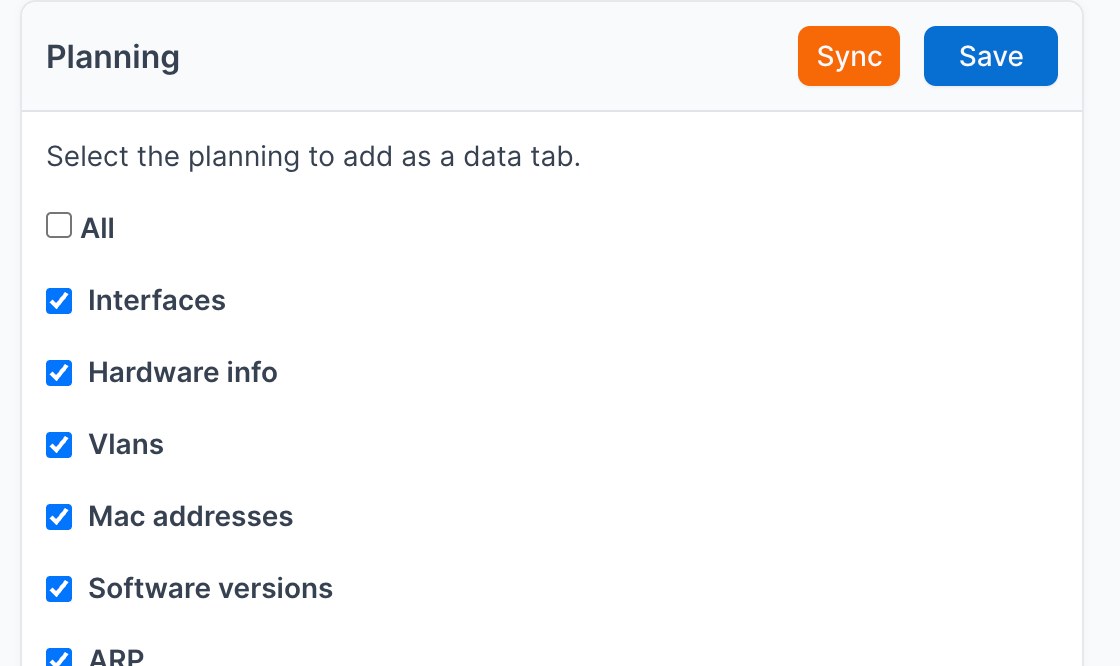
Data tabs: on the second tab, pick which plannings appear as an extra tab on every NetBox device page: interfaces, hardware, VLANs, MAC addresses, software versions, ARP, LLDP, CDP, clock, routing table, VRFs. Live device data, read-only, inside NetBox.
Step 2 · Onboard devices
Onboard discovered devices
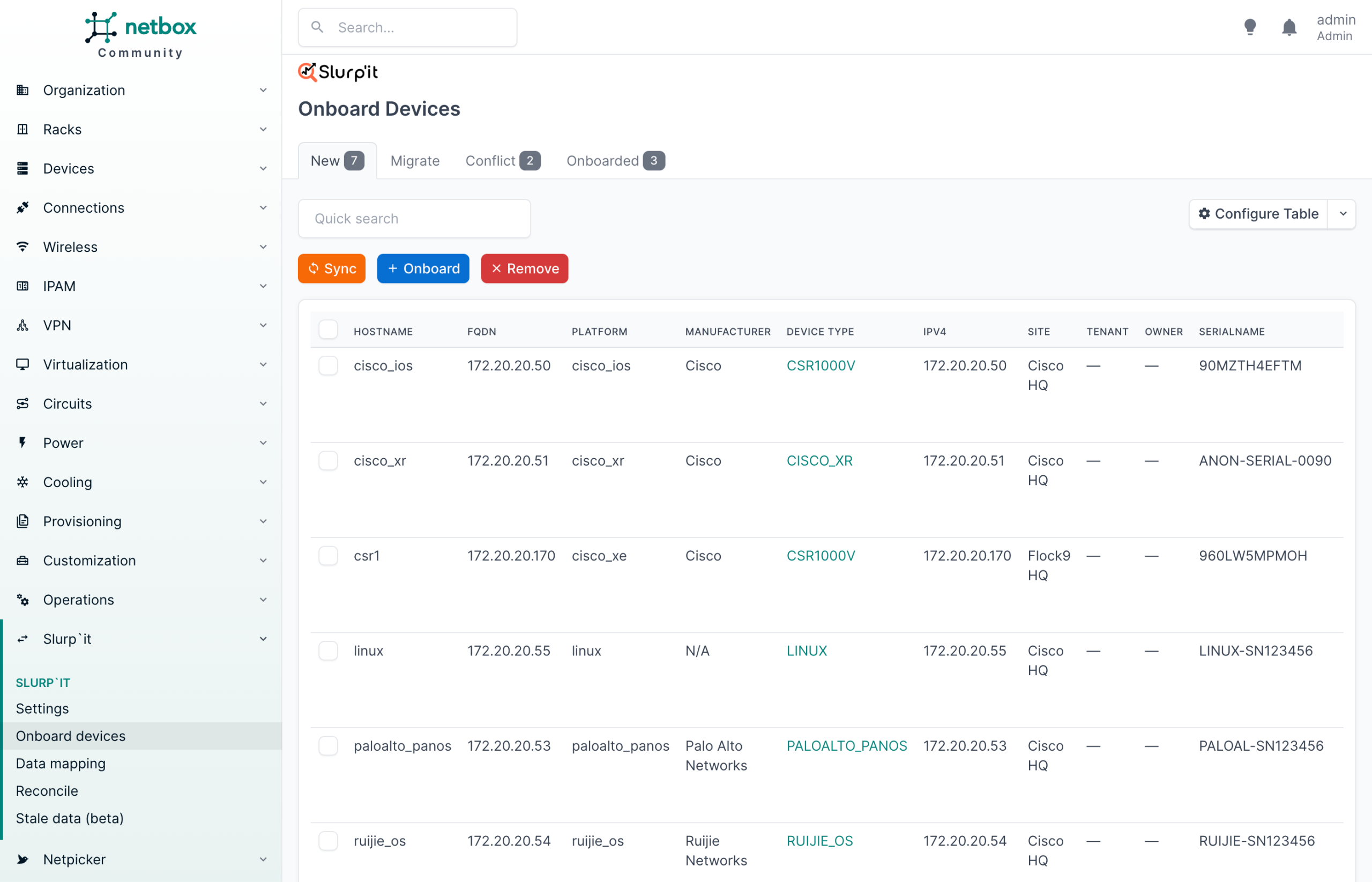
Slurp'it → Onboard devices lists every device Slurp'it has discovered, sorted into four tabs:
| Tab | Meaning | Action |
|---|---|---|
| New | Discovered, not in NetBox | Select → Onboard |
| Migrate | In NetBox, not linked to Slurp'it | Migrate |
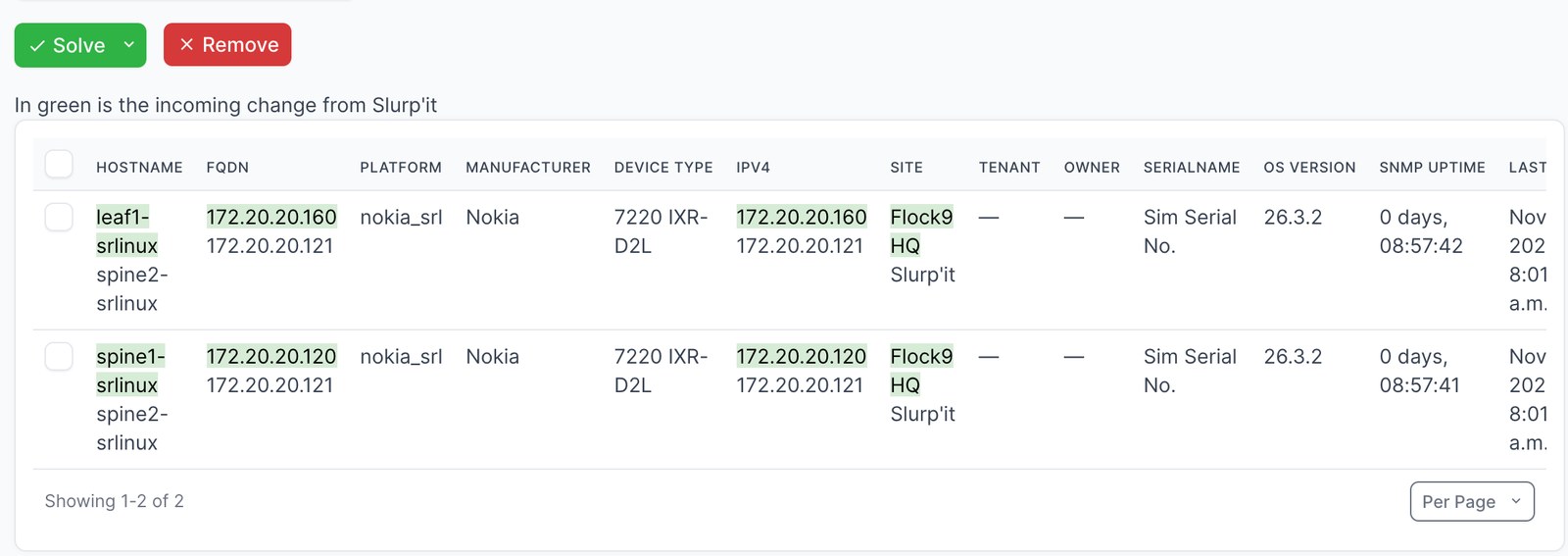
| Conflict | In NetBox with different values | Solve or Remove |
| Onboarded | Linked and in sync | Nothing |
Select devices and click Onboard. NetBox opens its own bulk-edit form, pre-filled from discovery: management interface, status, device type, role, site. Override anything before it is written, add a changelog message, and run big batches as a background job. Manufacturers, platforms and device types that NetBox doesn't have yet are created as part of onboarding; you can also match on the ones you modelled.
Brownfield? Devices that already exist in NetBox with a different hostname, IP or site land on the Conflict tab, with the incoming value in green next to the NetBox value. Solve applies it, Remove keeps NetBox as it is. Nothing is overwritten silently.
Step 3 · Data mapping
Map interfaces, IPs, prefixes, VLANs and VRFs
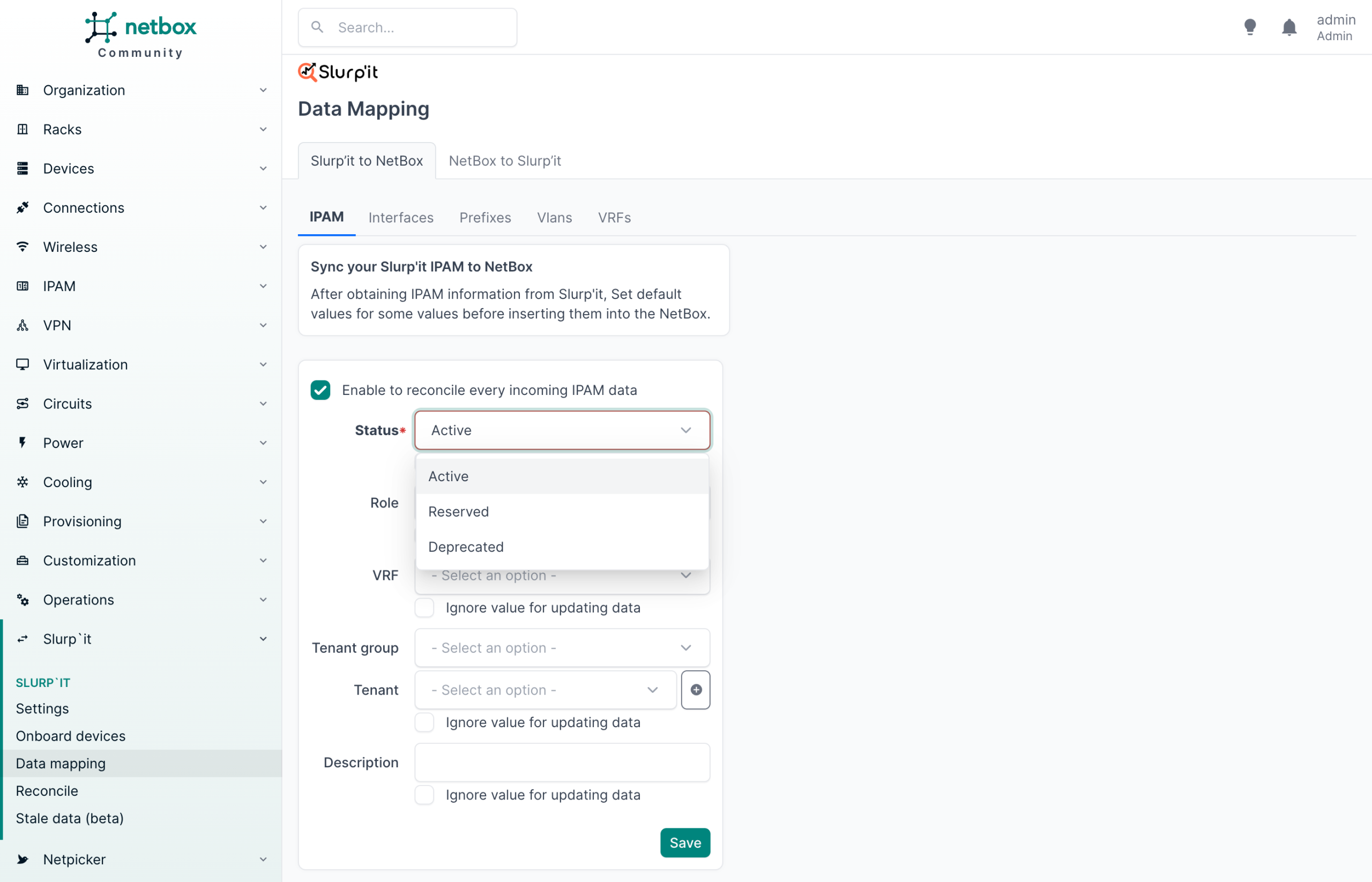
Devices are the start; the value is in the data under them. Slurp'it → Data mapping → Slurp'it to NetBox has a tab per object type: IPAM (IP addresses), Interfaces, Prefixes, VLANs, VRFs. Per tab you set:
- Enable to reconcile every incoming … data: route records through Reconcile instead of writing them directly.
- Default values discovery cannot know: status, role, VRF, tenant group, tenant, description.
- Ignore value for updating data per field: set once at creation, never overwrite later. This is how NetBox-owned fields stay safe.
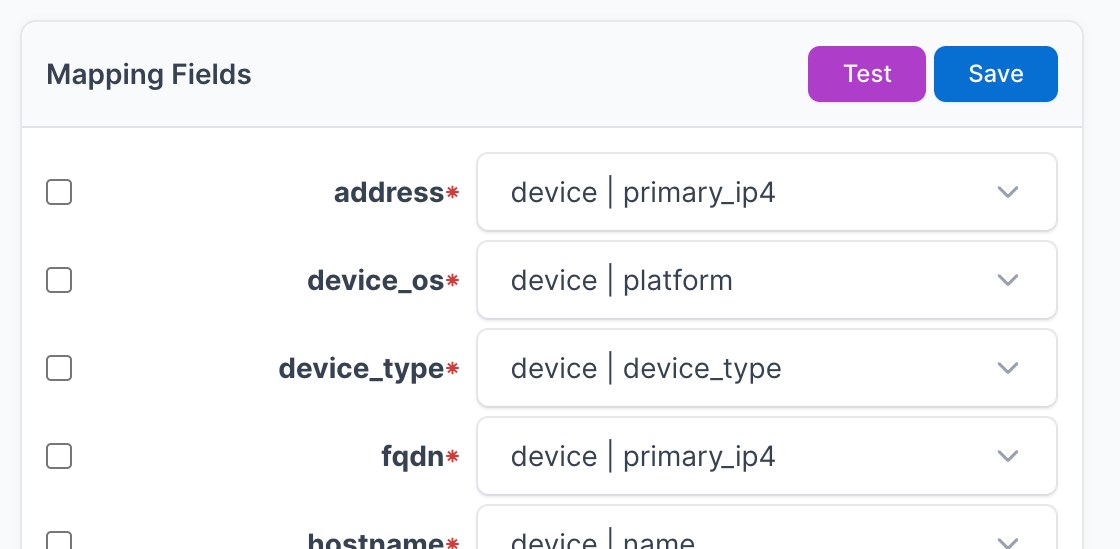
The other direction. Already have a filled NetBox? The NetBox to Slurp'it tab sends your NetBox devices to Slurp'it so it can start collecting from them: map address, device_os, device_type, fqdn and hostname to NetBox attributes such as device | primary_ip4 and device | platform, filter on management status, Test, Save, Sync.
Step 4 · Reconcile
Reconcile before you write
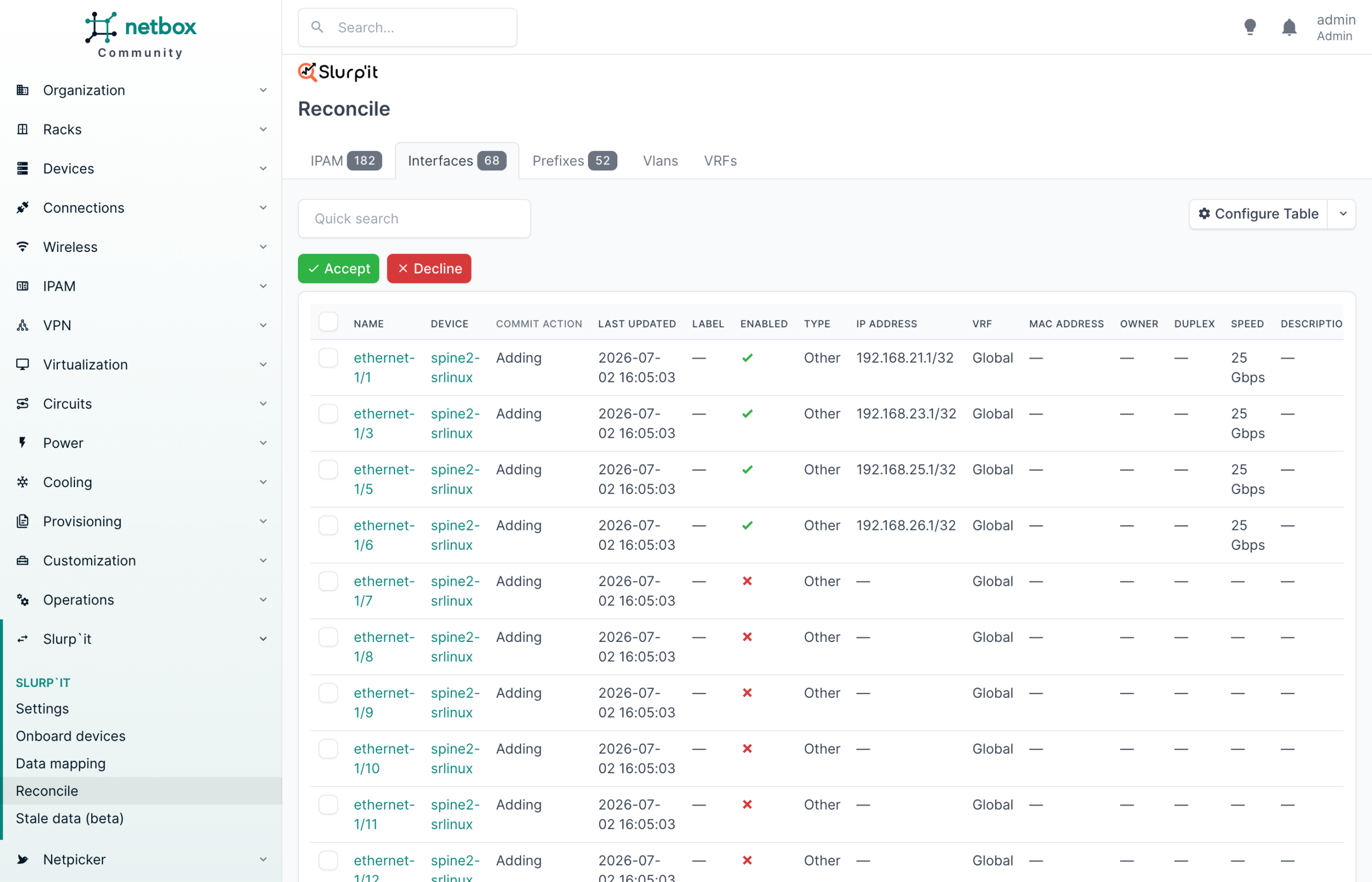
With reconcile on, nothing lands in NetBox until someone looks at it. Slurp'it → Reconcile shows a queue per object type with a count; in the sandbox 182 IP addresses, 68 interfaces, 52 prefixes.
Each row shows the object, its device, the commit action (Adding, Updating), when it was last seen, and the fields that would be written. For an interface that is name, enabled, type, IP address, VRF, MAC address, duplex, speed and description. Select rows and Accept or Decline; the pencil edits one record before accepting. The same record reported every run produces one item, not one per run.
Practical rule: run the first weeks with reconcile on for everything. Once a data type produces no surprises, switch reconcile off for that type and let it sync directly. Protected fields stay protected either way.
Step 5 · Stale data
Clean up what the network no longer has
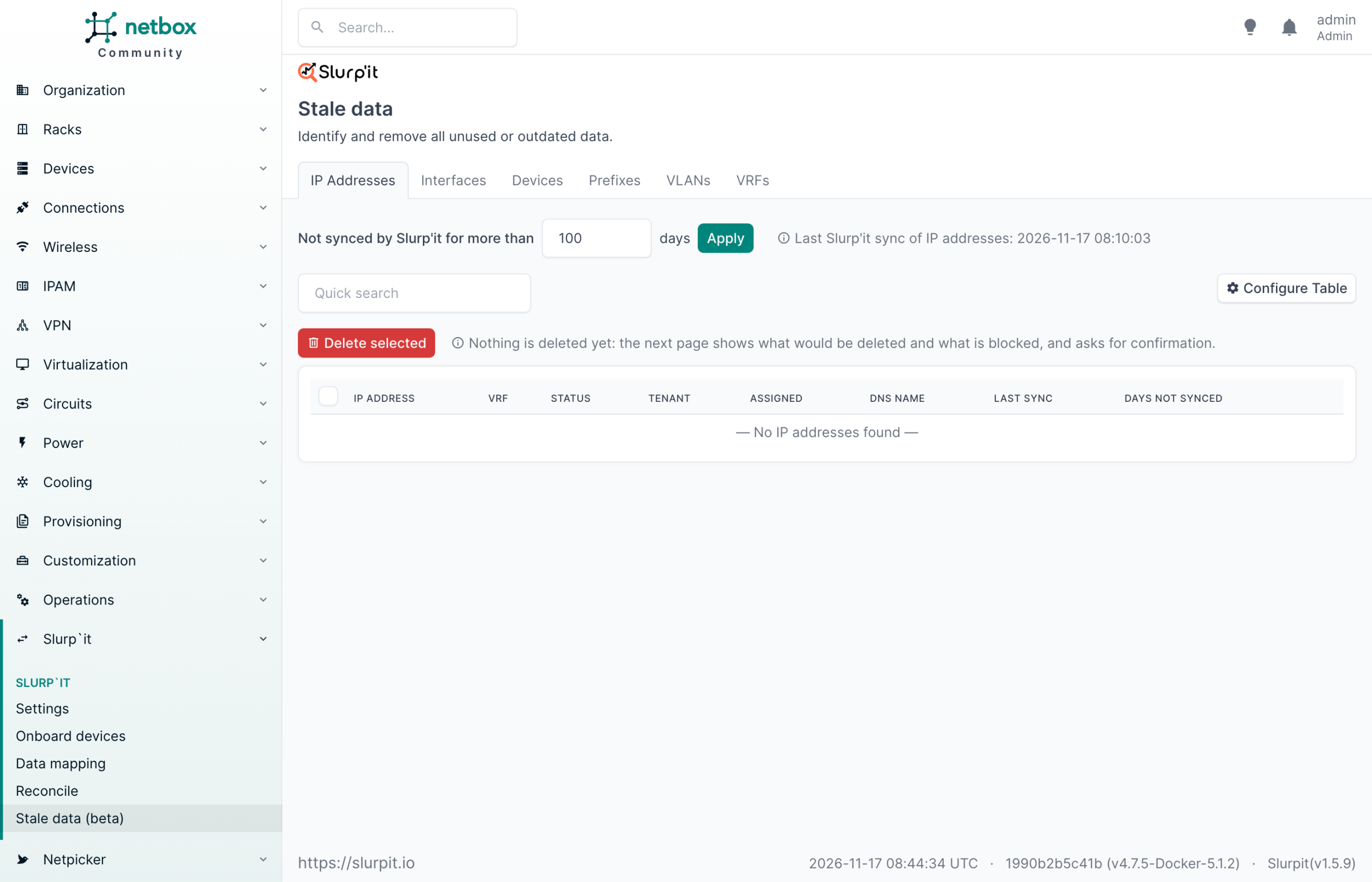
Networks shrink as well as grow. Slurp'it → Stale data lists IP addresses, interfaces, devices, prefixes, VLANs and VRFs that Slurp'it has not reported for more than n days (default from Settings, adjustable per query). Select what you want gone and click Delete selected. Nothing is deleted yet: the next page shows what would be deleted and what is blocked by NetBox dependencies, and asks for confirmation. It also checks that the collector was actually running, so an outage never looks like a decommission.
Stale data is marked beta in plugin 1.5.x.
What you end up with
Ordinary NetBox devices, filled from the network: role, platform, primary IP, serial, manufacturer, device type, interfaces and IPs, plus a Slurp'it tab with the live collected data.
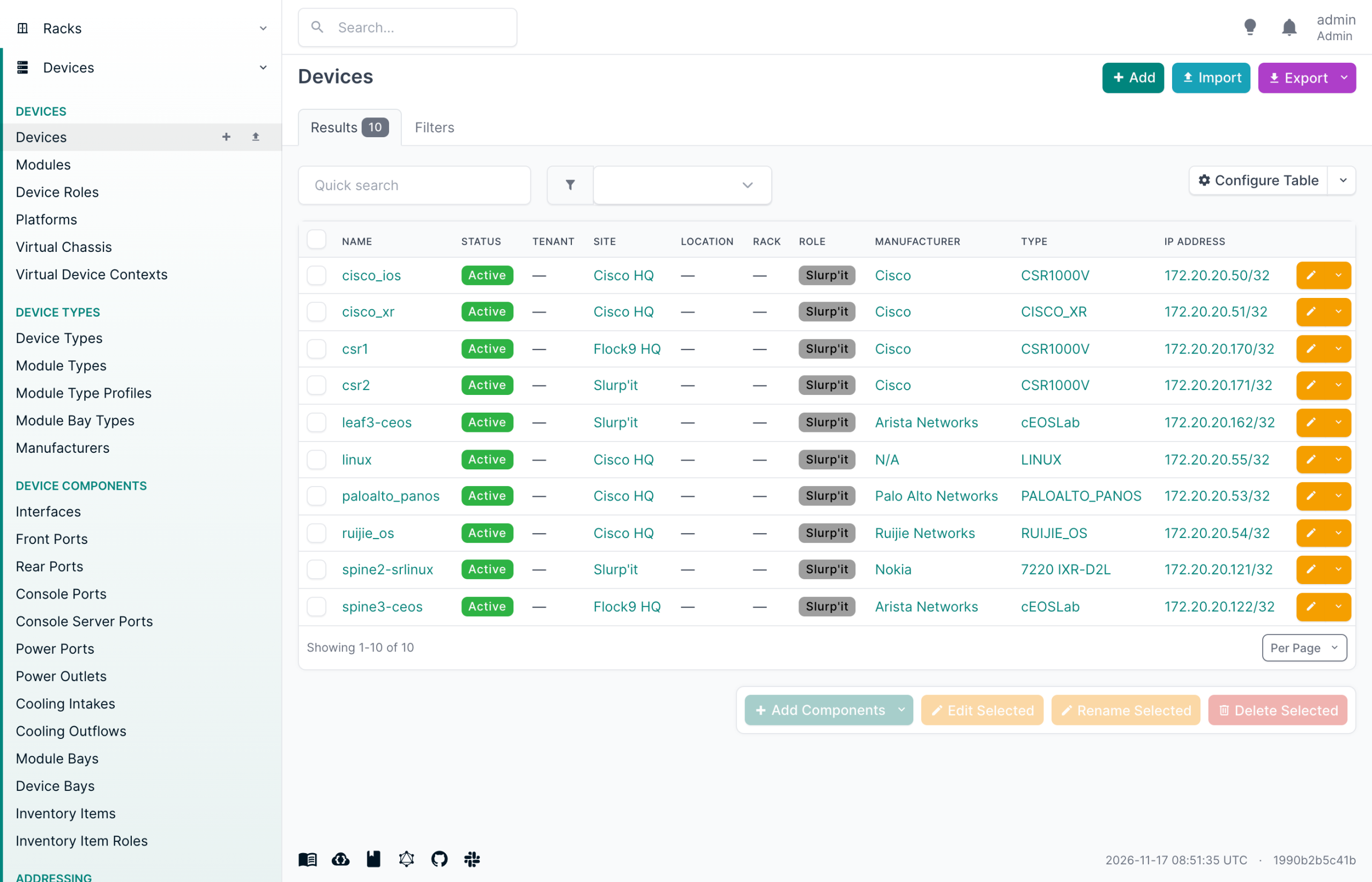
The NetBox device list after onboarding: ten devices, five vendors, role, site and primary IP set.
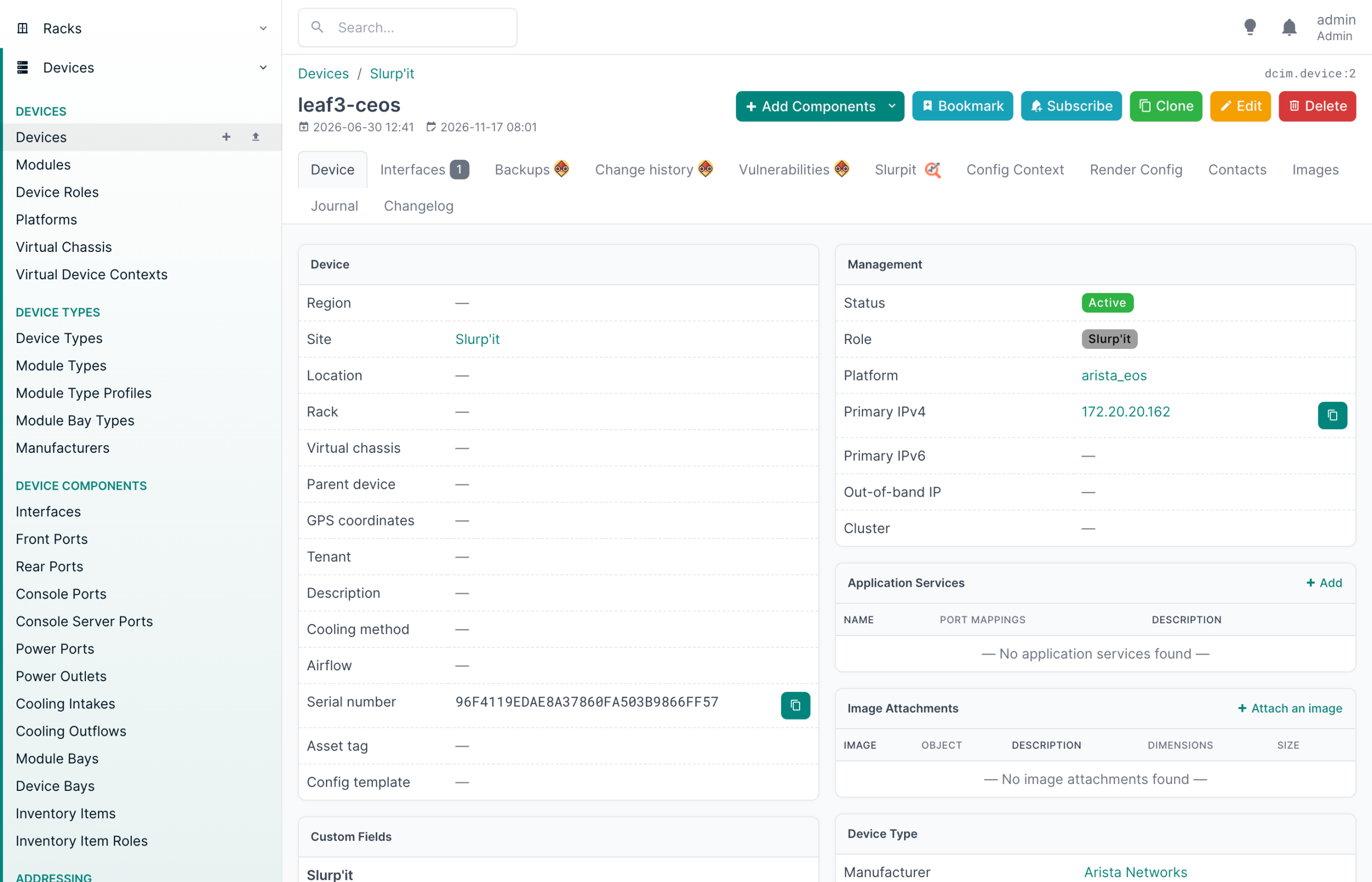
A device page: serial, platform and primary IP from discovery, and a Slurp'it tab with ARP, LLDP, routing and more.
How this fits a source-of-truth workflow
NetBox holds what the network should be. Slurp'it shows what it is. The plugin keeps the difference visible and under your control.
Who owns which field
| Field | Owner | Plugin setting |
|---|---|---|
| Site, role, rack, tenant, lifecycle status | NetBox (intent) | Ignore value for updating data |
| Platform, serial, software version, primary IP | Slurp'it (fact) | Sync; reconcile while you build trust |
| Interfaces, IPs, prefixes, VLANs, VRFs | Slurp'it (fact) | Per type: defaults + reconcile on |
| Devices no longer seen | Review | Stale data, confirm before delete |
The loop
- NetBox owns intent. Protect those fields and discovery never touches them.
- Slurp'it owns facts. Let those sync on the collection schedule you set.
- Reconcile owns the gap. Every difference becomes an accepted update, a declined record or a fix in the network.
- Stale data closes the loop. What the network stopped reporting is reviewed and removed, not forgotten.
Does Slurp'it replace NetBox? No. It populates and checks NetBox. The same collected data also builds a live network topology, a Slurp'it add-on separate from the plugin.
Frequently asked questions
Does the Slurp'it NetBox plugin create device types and platforms automatically?
Yes. Manufacturers, platforms and device types that NetBox doesn't have yet are created as part of onboarding. You can change them in the onboarding form before anything is written, or match on the models you already have.
What happens if a device already exists in NetBox?
It appears on the Conflict tab with the incoming value highlighted next to the NetBox value. You choose Solve (apply) or Remove (keep NetBox as is). Devices in NetBox that aren't linked to Slurp'it yet appear under Migrate.
Does discovered data overwrite NetBox automatically?
Only if you let it. With “Enable to reconcile” on, every incoming record waits in the Reconcile queue for Accept or Decline. Fields marked “Ignore value for updating data” are never overwritten, reconcile or not.
Which NetBox versions are supported?
NetBox 3.7 through 4.7, on-prem and NetBox Cloud. Each NetBox minor version has a matching plugin series (NetBox 4.7 needs 1.5.x, 4.6 needs 1.4.x, and so on). The current version is on PyPI.
Is this agent-based?
No. Slurp'it collects over SSH, Telnet, SNMP, TL1 and cloud controller APIs, with no agents on the devices.
Can I sync interfaces, IP addresses, prefixes and VLANs to NetBox?
Yes. Data mapping has a tab for IPAM (IP addresses), Interfaces, Prefixes, VLANs and VRFs. Per type you set default values, mark fields that must never be overwritten, and choose whether records go through Reconcile first.
Can I use my existing NetBox inventory as the device list for Slurp'it?
Yes. The NetBox to Slurp'it mapping sends NetBox devices (hostname, primary IP, platform, device type) to Slurp'it so it can start collecting from them. Set Data synchronization to Pull or Both.
How does Slurp'it handle devices that disappear from the network?
The Stale data page lists devices, interfaces, IPs, prefixes, VLANs and VRFs that Slurp'it hasn't reported for a configurable number of days. You select what to delete; the plugin shows what would be removed and what is blocked, and checks that the collector was running, before asking for confirmation.
Is the plugin open source, and is Slurp'it free?
The plugin is open source, published on PyPI and GitLab. Slurp'it Foundation is free forever with unlimited devices: discover every device, onboard it into NetBox and keep the device list in sync, plus all Professional features for 10 devices. Professional adds the full inventory for every device.
Does Slurp'it replace NetBox?
No. NetBox holds the intended state; Slurp'it holds the actual state. Slurp'it populates and checks NetBox and shows you the differences.
Try the whole flow in 30 minutes
The NetBox sandbox has the plugin pre-installed and a network to discover. Or download Slurp'it, install the plugin and onboard your first site, free.